A thoughtful gift for a programmer can make a desk more comfortable, support calls and recordings, or add useful flexibility to a daily setup.
These eight ideas range from compact accessories to larger workspace upgrades, with options for different routines and gifting budgets.
8 Gift Ideas for Programmers
FIFINE T669 USB Condenser Microphone Kit

- USB plug-and-play connection for PC and laptop recording.
- Includes a desktop boom arm stand and USB cable.
- A double pop filter helps minimize popping sounds.
Best Gift For: A programmer who records podcasts, voiceovers, or online content at home.

Nulaxy Pull-Out Height Adjustable Laptop Stand

- The screen height adjusts for seated or standing positions.
- Fits laptops from 10 to 17 inches.
- Folds compactly for storage or travel between workspaces.
Best Gift For: A programmer who switches between seated and standing work at a desk.
SteelSeries Apex Pro Full-Size Wired Gaming Keyboard

- Offers per-key actuation adjustment.
- The OLED display shows information from games and apps.
- USB passthrough connects an additional powered device.
Best Gift For: A programmer who enjoys customizing key response and using a full-size keyboard.
SteelSeries Aerox 3 Wireless Gaming Mouse

- The holey shell weighs 68g.
- Connects over 2.4GHz wireless or Bluetooth 5.0.
- Three-zone RGB lighting has configurable colors.
Best Gift For: A programmer who also enjoys wireless PC gaming and adjustable lighting.
Nylavee Desktop Computer Speakers

- Includes two full-range speaker units for stereo sound.
- Touch controls offer six lighting modes.
- Connects with a 3.5mm audio cable and USB power cable.
Best Gift For: A programmer who wants wired desktop audio for music, videos, or gaming.
SABRENT 5-in-1 USB-C Hub, 4K HDMI
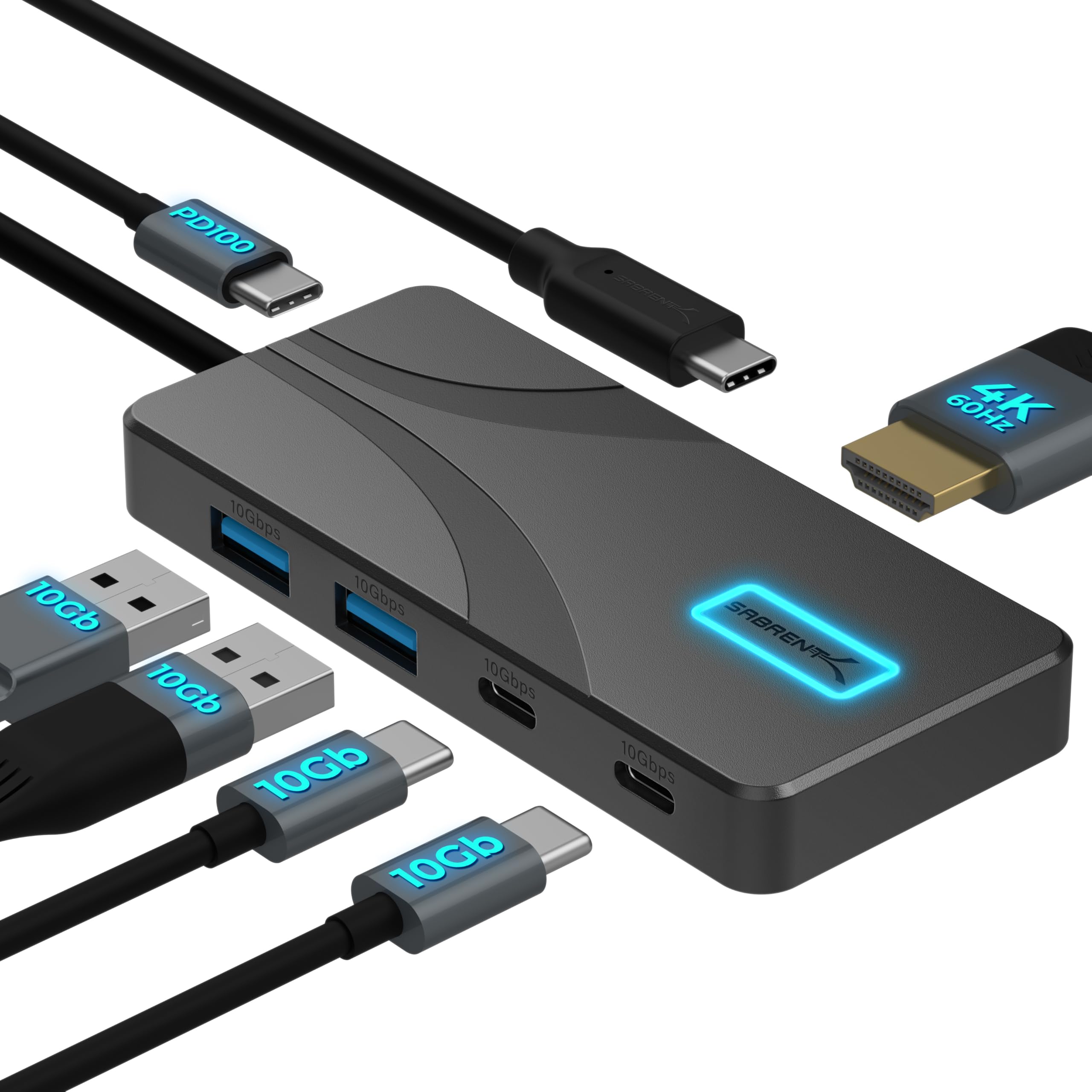
- Provides HDMI output up to 4096×2160@60Hz.
- Includes USB-A and USB-C data ports rated at 10Gbps.
- Passes up to 80W to a laptop when connected to a 100W USB-C PD charger.
Best Gift For: A programmer with a compatible USB-C laptop or tablet who connects peripherals and an external display.
JLab Go Air Pop True Wireless Earbuds

- The charging case has an integrated USB cable.
- Three EQ settings offer different sound profiles.
- Either earbud can be used independently.
Best Gift For: A programmer who listens to audio from a phone, tablet, or laptop during breaks or commutes.
JLab Go Work Wireless Headset (1 Pack)

- Bluetooth multipoint connects to two devices at once.
- The boom microphone rotates out of the way for listening.
- A red LED indicates when the microphone is muted.
Best Gift For: A programmer who moves between laptop work and mobile calls or video conferences.
Choosing gifts for programmers by daily routine
Start with the recipient’s ordinary workday. Someone who spends long stretches at a desk may appreciate an adjustable laptop riser, while a person who records tutorials or joins frequent calls may get more use from a microphone or headset.
A programmer who regularly connects displays and peripherals could value a hub, provided it matches their device.
Notice what they already own before choosing. A crowded desk may call for one small connection accessory; a simple setup could benefit from audio or a more flexible screen position.
If you can, check whether the recipient uses a laptop, desktop, or both, and whether they already have a preferred keyboard, mouse, or headset.
Think about how the gift will fit into the space. Desk size, cable routing, shared rooms, and whether the person works in more than one location can change what feels useful.
A compact accessory is easier to place, while a larger upgrade makes sense when you know there is room for it.
Balance the budget with everyday usefulness
Set a comfortable spending range before browsing. Smaller accessories can make thoughtful gifts when they solve a clear annoyance, such as limited ports or the need for convenient listening.
A bigger purchase is easier to justify when it would serve the recipient regularly and suits equipment they already use.
For gifts for programmers, compatibility can matter as much as the price. Check the computer’s available connections, operating system support, and any requirements for external displays or charging.
For audio gear, consider whether the recipient prefers wired or wireless use and whether a microphone is useful for their calls.
Avoid paying for features the person is unlikely to use. Lighting or customization can be fun for someone who enjoys a personalized setup, while a practical desk accessory may be a better fit for someone who prefers a clean, quiet workspace.
Compare current prices and details before deciding.
Personalize gifts for programmers with a thoughtful presentation
A useful gift feels more personal when it reflects a specific habit. If the recipient talks about recording demos, building a home workspace, or changing between devices, choose around that routine and include a short note explaining why it made you think of them.
The note can be warm without making the gift feel like work equipment.
Consider the recipient’s setup before adding extras. A hub may call for a reminder to check device compatibility; a headset or earbuds might pair nicely with a handwritten playlist suggestion.
Keep add-ons modest and relevant, and avoid assuming that a programmer wants novelty tech simply because it looks colorful.
Presentation can make a practical item feel considered. Wrap a compact accessory with a small card, or place a larger desk gift in a reusable bag that is easy to carry home.
If the gift needs setup or pairing, leave that choice to the recipient and keep the package itself simple.
Make a practical choice without overthinking it
When you are unsure, look for the most obvious gap in the recipient’s routine. Do they often run out of ports, adjust their laptop position, or switch between computer and phone calls?
A gift tied to a repeated task is more likely to be appreciated than an elaborate device chosen without clues.
For gifts for programmers, use public product information to verify compatibility, dimensions, included accessories, and power needs before ordering. These details can affect whether an item fits a desk or works with a particular computer.
Check the latest product details rather than relying on assumptions about a model or connection.
If you are shopping close to an occasion, check delivery estimates and return terms before buying. Choose a seller and option that fit your timing, and keep a backup idea in mind in case the preferred item will not arrive when needed.
A clear note or digital card can help mark the occasion while a physical gift is on its way.
Last-minute buying advice for gifts for programmers
For a quick decision, narrow the choices to a category you know the person uses: desk comfort, audio, input devices, or connectivity. Confirm that the selected item matches their computer and workspace, then review what is included so you know whether any necessary cables or accessories are part of the package.
Keep the gift presentation flexible if timing is tight. A printed note can explain the idea, and a gift receipt gives the recipient room to exchange a choice that does not fit their setup.
Check the estimated arrival date and current availability at checkout, since those can change.
The best choice is usually one the recipient can use without rearranging their entire workspace. A compact upgrade may be easier to welcome than a bulky addition, and a familiar brand or category can reduce guesswork when you know their preferences.
Focus on a real routine and let the details guide the final pick.